Meter Invoice
The Meter Invoice is a dedicated invoice document for a reservation's meter activity. It consolidates every meter reading on the reservation, the resulting charges, and (when the client has a credit wallet) the deposit balance and credit usage tied to those charges into a single printable, emailable document.
It's an expanded, focused alternative to the meter section that already appears inside the regular reservation invoice. Both views remain available: use the reservation invoice for a complete reservation statement, and the meter invoice when staff or guests want a refined, meter-only breakdown.
When the Meter Invoice is available
The Meter Invoice action appears whenever a reservation has at least one meter reading. It does not require credits to be funded; the invoice simply omits the deposit section for clients with no wallet activity.
What's on the Meter Invoice
The meter invoice pulls together everything related to meter activity for the reservation:
- All meter readings: previous and current readings, usage (current minus previous), units, rate, and the resulting charge per reading.
- Reading dates: when each reading was taken, in the order they were recorded.
- Meter totals: total units consumed, total billed amount, and any allowance carryover.
- Meter-linked payments: only payments tagged as Linked to Meter appear on this invoice (see Linked payments below). Reservation-level payments and POS-linked payments are excluded so the meter section reconciles cleanly on its own.
- Credit balance (when present): the client's current credit wallet balance and the per-pool breakdown (Meter, POS, Any).
- Credit usage on meter charges: every credit application that landed on a meter reading on this reservation, with a reference back to the reading it was applied to.
- Reservation and guest details: reservation number, lot, guest name, and arrival/departure dates so the document stands on its own.
Because the invoice surfaces both the deposits on file and how those deposits were used against meter charges, it works well for seasonal sites where guests pre-pay a meter deposit and want to see exactly where their money went at the end of the season.
Credit Summary section
The bottom of the meter invoice ends with a Credit Summary / Sommaire du dépôt box that breaks down deposit activity on this reservation. It lets the guest see at a glance how their up-front deposit was used, without having to cross-reference the credits history.
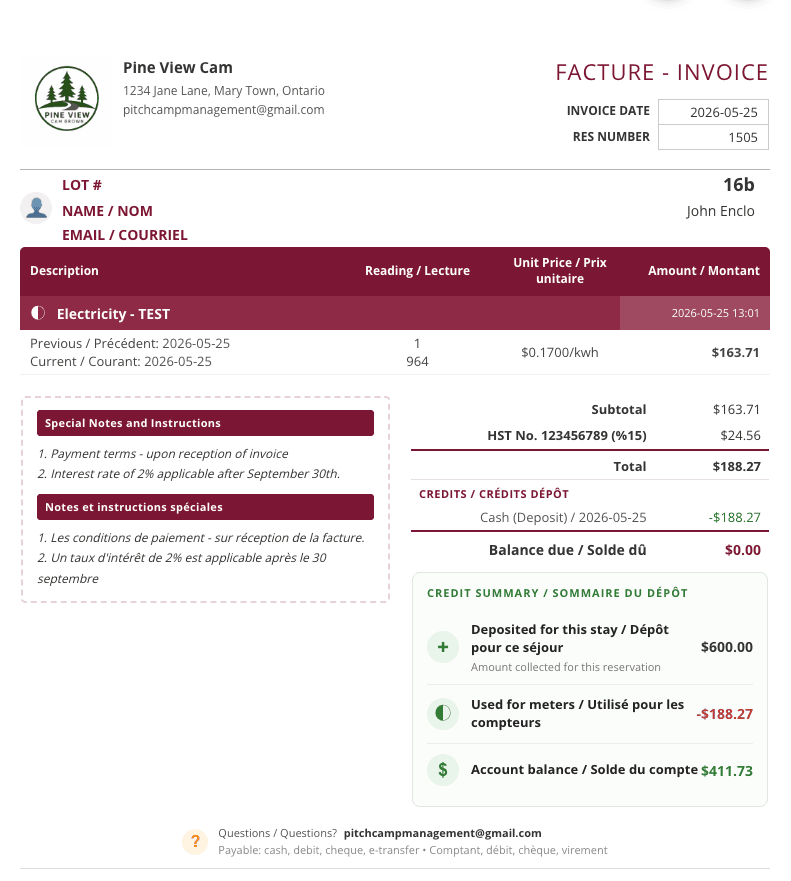
A full Credit Summary can include up to five rows. Some are always shown, others appear only when the reservation has the corresponding activity.
- Deposited for this stay (+): the amount the client funded toward this reservation's wallet. Always shown when the client has any deposit activity. The invoice repeats the caption Amount collected for this reservation underneath.
- Used for meters (◐): the portion of the deposit that was applied to meter charges on this reservation. Shown in red as a negative amount. Always shown.
- Credit Refunded to client (↩): appears only when some of the deposit was refunded back to the original payment source (Stripe card or cash drawer). Shown in red as a negative amount.
- Used elsewhere (⊞): appears only when some of the deposit was applied to other charge categories on this reservation. The description spells out which categories were affected, in both English and French (for example, POS, Reservation / PDV, Réservation).
- Account balance ($): the wallet balance remaining for the client after all of the above. Shown in green.
The top row is what came in. The middle rows are what went out. The bottom row is what is left. Rows that do not apply to a given reservation (no refund, no usage elsewhere) are simply omitted. The icons mirror the action: a plus for funding, the half-moon glyph for meter usage, a return arrow for refunds, and a dollar sign for the remaining balance.
For seasonal sites where a guest pre-pays a meter deposit at the start of the year, this section is the single source of truth for where the deposit went. It removes most of the follow-up questions (such as "did you actually deposit my money?" or "where did the extra $40 go?") because the breakdown is right on the document the guest receives.
Linked payments
Every payment on a reservation now carries a linking status that controls which invoice it appears on and how the totals reconcile. There are three states:
| Status | What it means | Where it appears |
|---|---|---|
| Unlinked | A general payment against the reservation, not tied to a specific charge type. | The regular reservation invoice. Not on the meter invoice. |
| Linked to Meter | The payment is allocated against the meter section of the reservation. | The Meter Invoice, and the meter section subtotal inside the regular reservation invoice. |
| Linked to POS | The payment is allocated against point-of-sale charges. | The POS section of the reservation invoice. Not on the meter invoice. |
You can filter the payment table by Linked or Unlinked to focus on a subset, and the Linked Charge column shows the status for each payment row.
For the staff-side workflow (creating, changing, or removing a link from the payment dialog or the payments table), see Adding a Reservation Payment → Linking a Payment to a Charge.
How meter-linked payments get created
There are two ways a payment ends up tagged Linked to Meter:
- Automatically, via credits. When a meter reading is saved and the client has a balance in an eligible credit pool (Meter or Any), the auto-prompt offers to apply credits. If the user confirms, the system creates a new payment for the chosen amount and links it directly to the meter charge. No extra step is needed. See Client Credits → Applying credits to a meter reading for the full flow.
- Manually, on the payment panel. When staff add a payment the regular way (cash, card, Stripe, etc.), the new linking field on the payment form lets them tag it as Linked to Meter, Linked to POS, or leave it Unlinked. This is useful when a guest pays specifically toward their meter balance and you want the meter subtotal to reflect that without having to fund credits first.
In both cases, the meter section subtotal in the reservation invoice updates immediately and the meter invoice shows the new payment in its own payments table.
Why this matters
Separating meter-linked payments from the rest of the reservation lets staff:
- See at a glance whether the meter side of a reservation is fully paid or carrying a balance, without doing math against camping rates, products, and fees.
- Hand a guest a focused meter statement that reconciles on its own.
- Reconcile seasonal meter deposits cleanly: a guest who pre-paid for the season can see exactly how their deposit was consumed reading by reading, with no unrelated reservation activity muddying the picture.
Opening the Meter Invoice
There are two entry points.
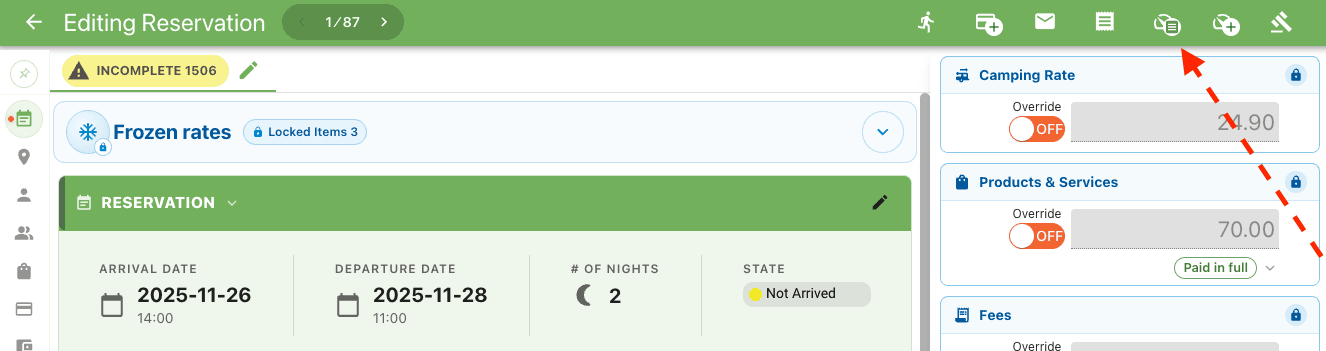
From the reservation editor
- Open the reservation.
-
In the actions menu, click Meter Invoice.
-
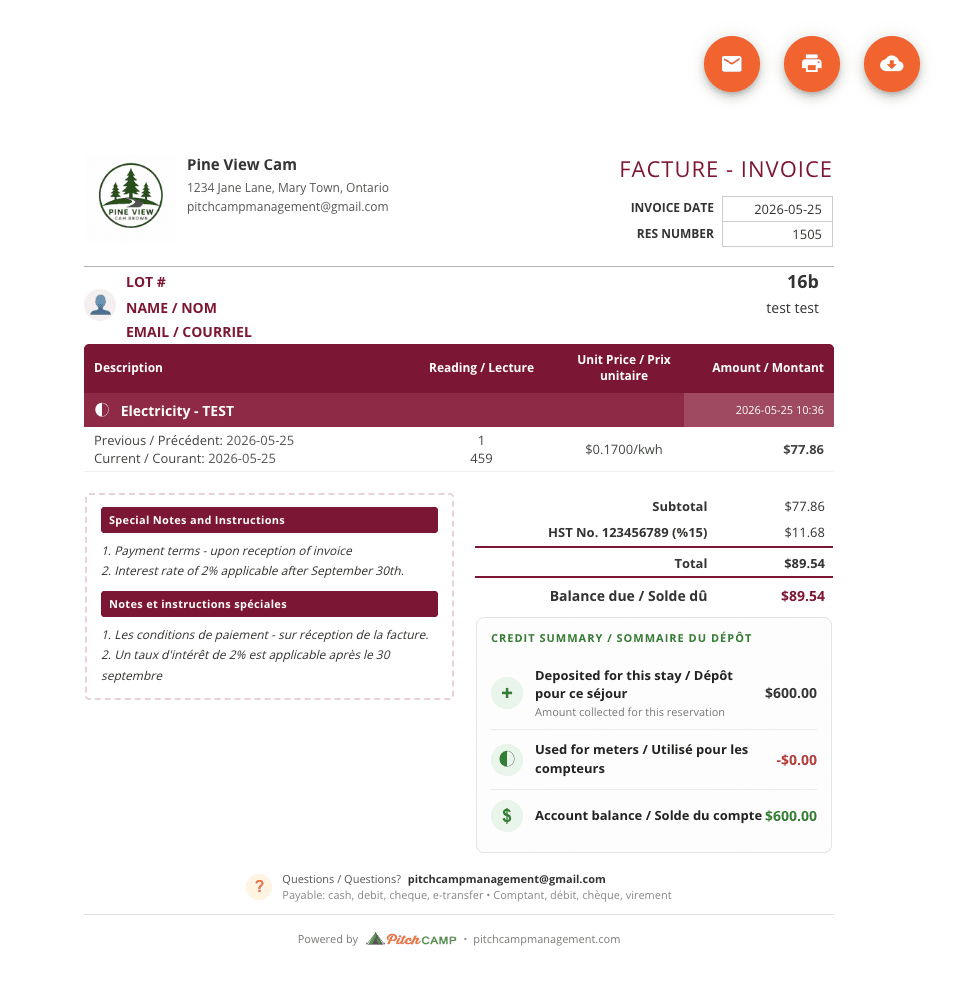
The Meter Invoice opens in the standard invoice panel with view, print, download, and email controls.
The action is hidden when the reservation has no meter readings.
From the reservation grid
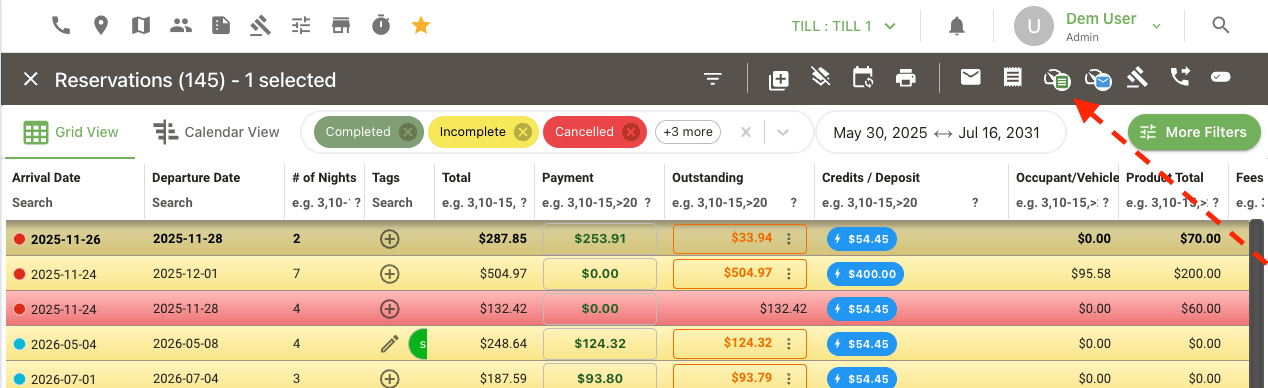
- In the Reservations grid, right-click (or open the row actions menu) on a reservation that has meter readings.
-
Choose Meter Invoice to view it, or Send meter invoice email to email it directly to the guest on file.
Printing and downloading
The Meter Invoice panel uses the same controls as the reservation invoice:
- Print sends the visible document to a print job (one continuous page).
- Download saves the document as a PDF.
Emailing the Meter Invoice
- Open the Meter Invoice (from the reservation editor or grid) and click the Email icon, or use Send meter invoice email directly from the reservation grid row menu.
- The email composer opens with the guest on file pre-filled. The toggle Include the meter reading invoice below the email message is on by default. The body of the email is editable as usual.
-
Click Send.
The sent email is recorded on the reservation's email history just like a regular invoice email.
Relationship to the regular reservation invoice
The Meter Invoice does not replace the meter section inside the regular reservation invoice. Both views show the same source data; they differ in scope:
| Reservation Invoice | Meter Invoice | |
|---|---|---|
| Scope | The full reservation: camping rate, products, fees, taxes, payments, meter section | Meter readings, totals, and linked credit activity only |
| Best for | A complete reservation statement | A focused, expanded view for meter-heavy or deposit-funded reservations |
| Shows credit balance and deposit usage | No, only the regular payment table | Yes, when the client has wallet activity |
| Bulk multi-reservation view | Yes (see Bulk Invoice Print) | Not bundled, one reservation at a time |
Related
- Client Credits for how the credit wallet works, including how a meter charge consumes credits.
- Entering a Meter Reading on a Reservation for adding readings.
- Reservation Grid for the row actions menu.