Rate Overview
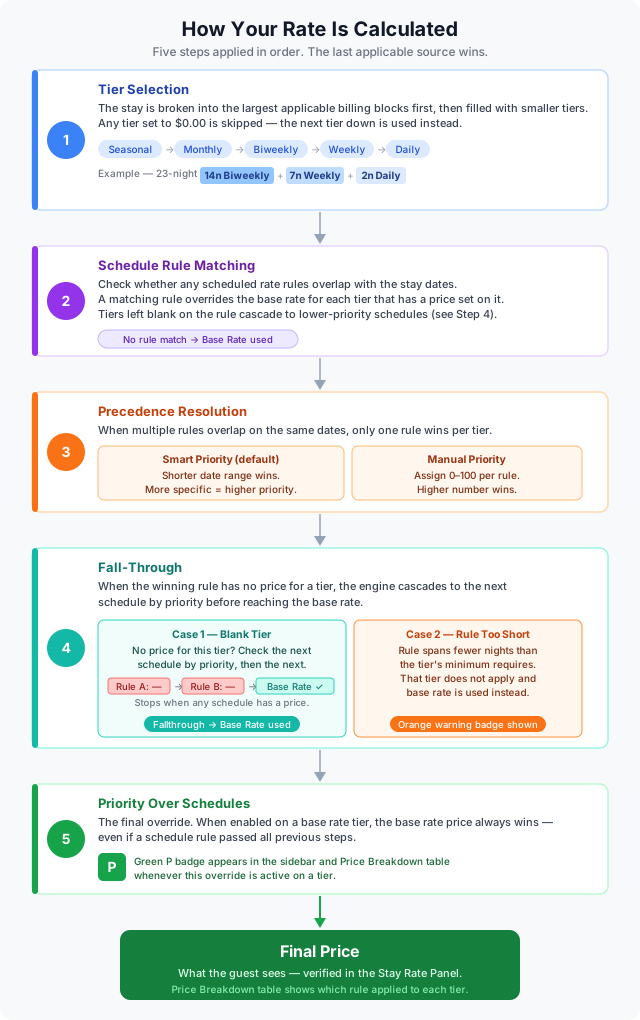
The Rate Overview explains how the system determines the final price for any reservation, from tier selection, to schedule rule matching, to precedence resolution, to fall-through behavior. Understanding these rules lets you build pricing that is predictable and intentional.
The Pricing Pipeline
Every reservation is priced through the following steps, in order:
- Tier selection, determine which pricing tiers apply based on the total number of nights.
- Schedule rule matching, check whether any scheduled rate rules cover those dates.
- Precedence resolution, when multiple rules overlap, determine which rule wins.
- Fall-through, fill any gaps where a rule cannot supply a price for a given tier.
- Priority Over Schedules, apply any base rate overrides that always win.
Step 1, Tier Selection
Each base rate has five pricing tiers. For any stay, the system breaks the total nights into the largest applicable blocks first, then fills the remainder with smaller tiers.
| Tier | Minimum nights | Billed in blocks of |
|---|---|---|
| Daily | 1 | 1 night |
| Weekly | 7 | 7 nights |
| Biweekly | 14 | 14 nights |
| Monthly | 28–30 | 1 month |
| Seasonal | Full season | 1 season |
Example, 23-night stay:
| Block | Nights |
|---|---|
| 1 × Biweekly | 14 |
| 1 × Weekly | 7 |
| 2 × Daily | 2 |
Skipping tiers: If a tier price is $0.00, it is skipped and the system moves to the next tier down.
Example, Biweekly set to $0.00, same 23-night stay:
| Block | Nights |
|---|---|
| 3 × Weekly | 21 |
| 2 × Daily | 2 |
Step 2, Schedule Rule Matching
Once the tiers are selected, the system checks whether any Scheduled Rate rules overlap with the stay dates.
A schedule rule overrides the base rate for any tier that has a price set on that rule. If the rule leaves a tier blank, the base rate is used for that tier within the rule's date range (see Fall-Through below).
Example, Rule with partial tier coverage:
- Base Rate: Daily $40 / Weekly $250
- Rule "Summer Surcharge" (June 1 – Aug 31): Daily $55 / Weekly (blank)
A 9-night stay fully inside Summer Surcharge:
| Block | Price source | Price |
|---|---|---|
| 1 × Weekly (7 nights) | Base Rate (rule left weekly blank) | $250 |
| 2 × Daily (2 nights) | Rule "Summer Surcharge" | $55 each |
Step 3, Precedence (Overlapping Rules)
When two or more schedule rules overlap on the same dates, the system uses the active priority mode to determine which rule's prices apply.
Smart Priority (Default)
The rule with the shorter date range wins. More specific rules always take precedence over broader ones. No manual setup is needed.
Example:
- Rule A: June 1 – Aug 31 (general summer surcharge, 92 days)
- Rule B: July 1 – July 7 (Canada Day long weekend, 7 days)
| Dates | Winning rule |
|---|---|
| July 1 – July 7 | Rule B (shorter, more specific) |
| All other summer dates | Rule A |
Manual Priority
Each rule is assigned a numeric priority (0–100). The higher number wins. When two overlapping rules share the same manual priority, the shorter date range is used as a tiebreaker.
Step 4, Fall-Through Behavior
Fall-through occurs when the winning schedule rule has no price for a specific tier. Rather than jumping straight to the base rate, the engine cascades down the priority list — checking each qualifying schedule in order — and uses the first one that has a price. Only when no qualifying schedule has a price does the system fall back to the base rate.
Case 1, Blank Tier — Priority Cascade
When a schedule rule has no price for a tier, the engine does not immediately fall to the base rate. It checks the next schedule rule in priority order to see if it has a price for that tier. If it does, that price is used. If not, the engine continues to the next, and so on.
The base rate is used only when no qualifying schedule has a price. A teal Fallthrough chip appears on the rule in the rule list when this final fallback to the base rate occurs.
Example — cascade through three rules:
- Base Rate: Daily $40 / Weekly $250
- Rule A "Summer" (Jun 1 – Aug 31, highest priority): Daily (blank) / Weekly (blank)
- Rule B "Peak" (Jun 1 – Aug 31, second priority): Daily $65 / Weekly (blank)
- Rule C "General" (Jun 1 – Aug 31, lowest priority): Daily $55 / Weekly $300
A 9-night stay in July:
| Block | Rule A | Rule B | Rule C | Price used |
|---|---|---|---|---|
| 1 × Weekly (7 nights) | blank | blank | $300 | $300 (Rule C) |
| 2 × Daily (2 nights) | blank | $65 | — | $65 (Rule B) |
The engine works through the priority list for each tier independently. As soon as a qualifying schedule has a price, the cascade stops. If Rule C also had no weekly price, the weekly block would fall back to the base rate ($250) and the teal Fallthrough chip would appear.
Case 2, Rule Too Short for a Tier
A schedule rule can only supply a tier price if its date range substantially covers the block window being priced. If the rule spans fewer nights than the tier's minimum requires, it does not qualify for that tier — and neither do lower-priority schedules for the same reason. An orange warning badge appears on the rule.
Example:
- Weekly tier requires 7 nights minimum.
- Rule "Short Break" covers June 14 – June 18 (5 nights), with Weekly: $290.
A 9-night stay from June 13 – June 21:
| Block | Notes | Price source | Price |
|---|---|---|---|
| 1 × Weekly (7 nights) | Rule spans only 5 nights, does not meet the 7-night window | Base Rate | $250 |
| 2 × Daily (2 nights) | Inside rule date range | Rule "Short Break" (daily price) | $60 each |
The rule cannot apply a weekly block across more nights than it covers. The weekly block falls to the base rate, and the orange warning badge is shown on the rule.
Step 5, Priority Over Schedules
The Priority Over Schedules toggle on a base rate tier is the final override in the pricing pipeline. When enabled for a tier, the base rate price for that tier always wins, regardless of any schedule rule.
This runs after all schedule matching and precedence resolution. Even if a schedule rule won the overlap contest, if the base rate has Priority enabled for that tier, the schedule price is ignored.
A green P badge appears next to the tier price in the sidebar and in the Price Breakdown table whenever this override is active.
Example:
- Base Rate: Monthly $600 with Priority Over Schedules enabled.
- Rule "Peak Season" (July 1 – Aug 31): Monthly $950.
A 30-night stay in July: the system calculates $600. The base rate wins for the monthly tier even though Rule "Peak Season" would have applied.
Use this to enforce a hard ceiling on long-stay pricing, preventing schedule surcharges from inflating monthly or seasonal totals beyond your intended limit.
Putting It All Together, Full Example
Setup:
- Base Rate: Daily $40 / Weekly $250 / Monthly $900 (Priority Over Schedules enabled on Monthly)
- Rule A (June 1 – Aug 31): Daily $55 / Weekly (blank) / Monthly $1,100
- Rule B (July 4 – July 7): Daily $80
Stay: July 2 – July 31 (29 nights)
Smart Priority mode is active. Rule B (4 days) is shorter than Rule A (92 days), so Rule B wins for July 4–7.
Tier breakdown: 1 × Monthly (28 nights) + 1 × Daily (1 night)
| Segment | Tier | Winning rule | Override? | Price |
|---|---|---|---|---|
| July 2 – July 30 (28 nights) | Monthly | Rule A ($1,100) | Priority Over Schedules → base rate wins | $900 |
| July 31 (1 night) | Daily | Rule A ($55) | No override | $55 |
Total: $955
Rule B's higher daily price for July 4–7 is irrelevant to the monthly block because the entire 28-night block is priced as a single monthly unit. The monthly total is $900 instead of $1,100 because Priority Over Schedules is enabled on the Monthly tier.
Summary of Override Precedence
When multiple pricing signals exist for the same tier and date range, the system resolves them in this order:
| Priority | Source | When it applies |
|---|---|---|
| 1 (highest) | Base Rate — Priority Over Schedules | Enabled on that tier |
| 2 | Winning Schedule Rule | Resolved by Smart or Manual priority mode |
| 3 | Next schedule(s) in priority order | Winning rule had no price for this tier — cascade continues |
| 4 (fallback) | Base Rate | No qualifying schedule has a price for this tier, or rule too short |
Related Pages
- Base Rates, tier configuration, Priority Over Schedules, and Min Night Rental.
- Scheduled Rates, creating rules, priority modes, and warning badges.
- Stay Rate Panel, view a live price breakdown for any stay.