Site Lock: Let Guests Pay to Guarantee the Exact Campsite
Quick answer: Site Lock is a PitchCamp Premium feature that lets a guest pay a one-time fee to guarantee the exact campsite they booked. You set the fee site by site. You also control every part of how it works, lot by lot: whether a site offers it at all, what it costs in July compared to May, how the guest is asked, who on your team can add, waive, remove or move a lock, and what happens when someone needs to move a locked reservation. It is off by default, it has its own switch in Campground Settings, and it is available on the Premium plan only.
Every campground has a site that guests ask for by number. The one by the water. The one with the shade. The corner site that backs onto the trees and has room for the slide-outs.
Those guests are not shy about it. They book early, they call to confirm, and a few of them write "please do not move us" in the notes. Meanwhile your front desk knows that on a busy weekend, a booking sometimes has to move.
That promise, "this exact site is yours", has real value to the guest. It has never had a price.
Key takeaways
- Site Lock is a paid guarantee of the exact site. The guest pays a one-time fee, and the reservation stays on that site.
- You set the fee on each site. A base fee for every lot, plus scheduled fees for the dates you choose, such as peak season. The fee is always shown before tax.
- Every part of it is controlled per lot. On or off, the fee, the dates, how the guest is asked and what they see first.
- Your staff decide the exceptions, on the record. Add a lock, waive a fee, remove a lock or move a locked reservation, each one under its own privilege and with a reason.
- It is off by default. A switch in Campground Settings turns it on for the whole campground, and nothing changes for guests until you also turn it on for a lot.
- It is a Premium plan feature. It is not part of the other plans.
What is Site Lock?
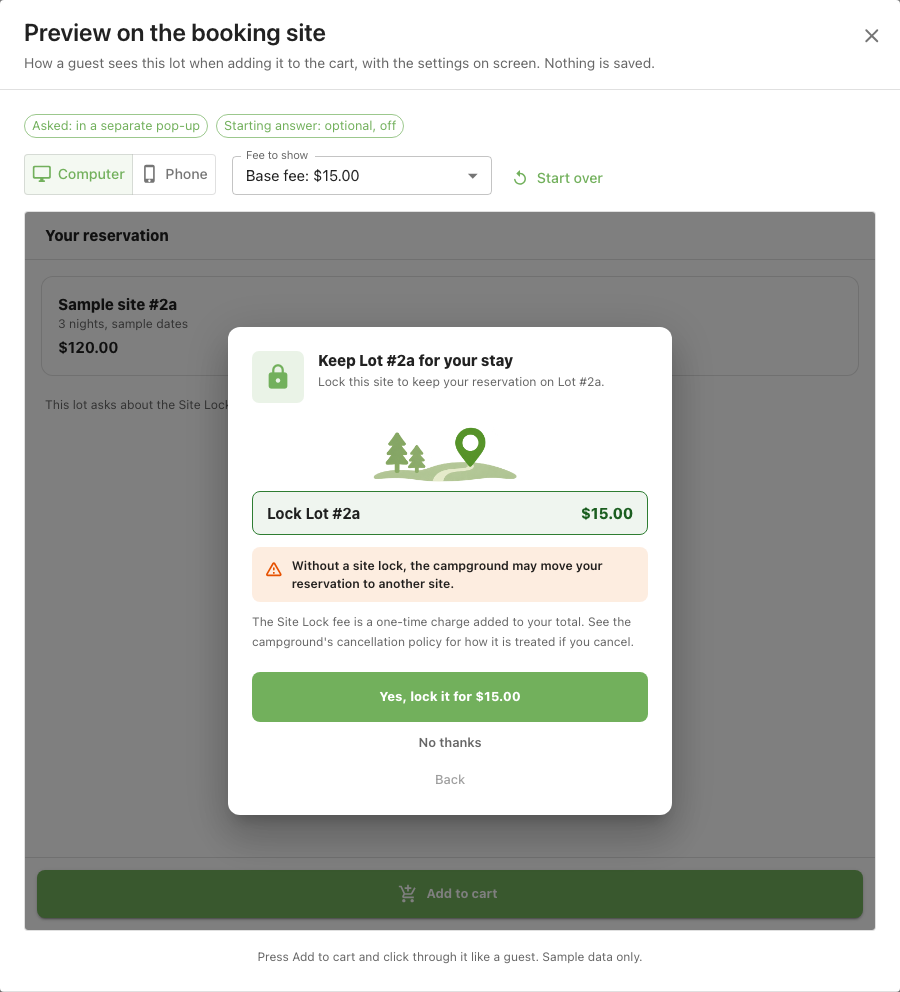
Site Lock is an optional, one-time fee a guest pays to keep the exact site they booked. Without it, your campground keeps the freedom to move the reservation. With it, the reservation stays where it is, and your team cannot move it without a recorded reason.
| Without a Site Lock | With a Site Lock |
|---|---|
| The guest books a site type or a site, and your team may need to move them. | The guest pays a fee and the reservation is guaranteed to stay on that exact site. |
| The guest hopes they get the site they picked. | The guest is told the site is theirs. |
| You earn nothing for the guarantee. | You earn the fee. |
A guest sees the offer while adding the site to the cart:
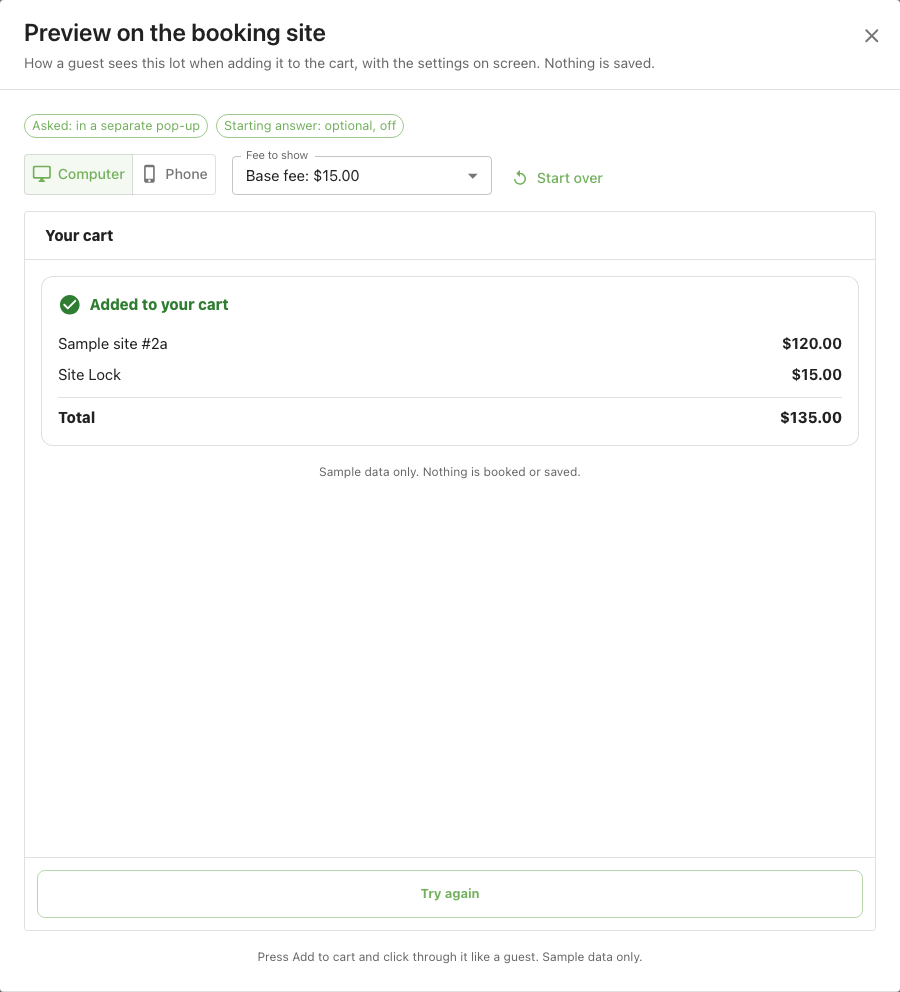
If they say yes, the cart shows a Site Lock line and the total:
A guest who booked without a lock can also add one later, from My Reservations, and a short line tells them that once it is on, only the campground can remove it.
The fee is a line of its own
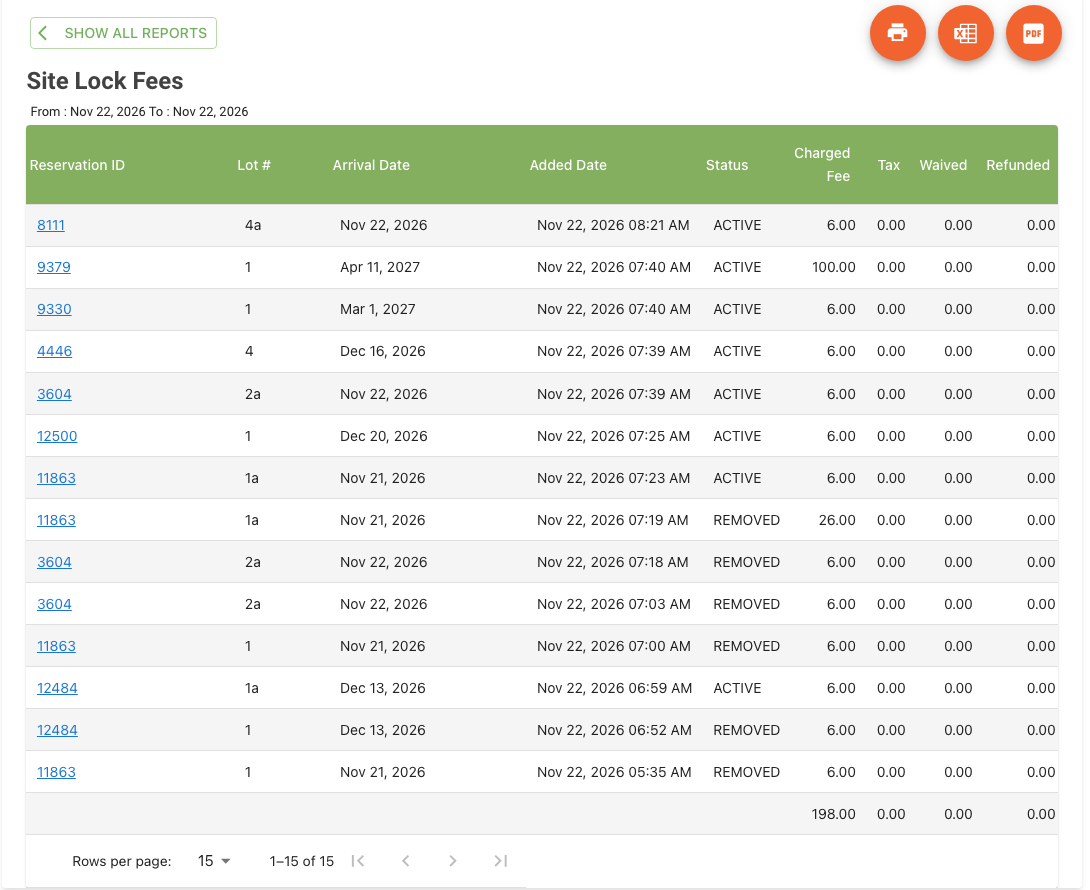
The Site Lock fee is added to the guest's reservation total as its own line, before tax, and it is tracked on its own from the first booking to the last report. You see it on the reservation, in a dedicated report, on your receipts and as its own category in the Daily Financial Close.
That is deliberate. A guaranteed-site fee that disappears into a general fee line is hard to price, hard to explain to a guest and hard to report on. With a line of its own, you can see how many guests chose it, what it earned and which lots sell it best.
How Site Lock is different: you control every step, lot by lot
Many platforms treat a guaranteed site as one switch for the whole campground: on or off, one price, one message. That works for a campground where every site is the same. Yours probably are not.
With PitchCamp, Site Lock is controlled on each lot. Here is what you decide, and where.
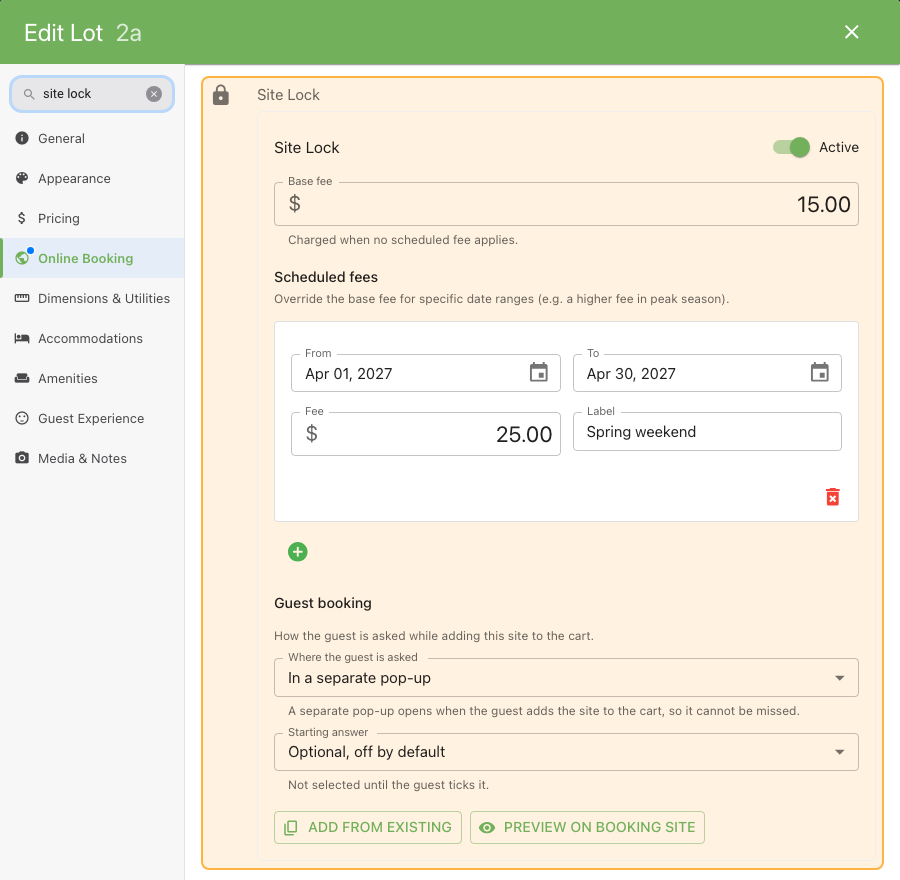
1. Which sites offer it
Switch Site Lock on for your lakefront sites and leave it off for the back row. A lot that is off never offers a lock. Locks you have already sold on it stay in place.
2. What each site costs
Every lot has its own base fee. A $25 lock on the lake and a $10 lock in the trees is one setting per lot. Zero is allowed if you want to offer it free.
3. What it costs on which dates
Add scheduled fees for date ranges. Charge $35 for the July long weekend and $15 the rest of the season. The guest's arrival date picks the fee, and date ranges cannot overlap, so there is never a doubt about which fee applies. Add a label such as "Peak season" so your team knows why. If the arrival date of a reservation changes later, its fee follows the new date, unless you set the amount by hand.
4. How the guest is asked
For each lot, choose where the offer appears:
- Inside the add-to-cart popup, as a checkbox with the other options.
- In a separate pop-up, so the guest cannot miss it.
And choose the starting answer:
- Optional, off by default. The guest ticks it if they want it.
- Optional, on by default. Pre-selected, and the guest can turn it off.
- The guest must choose Yes or No. They cannot continue until they answer.
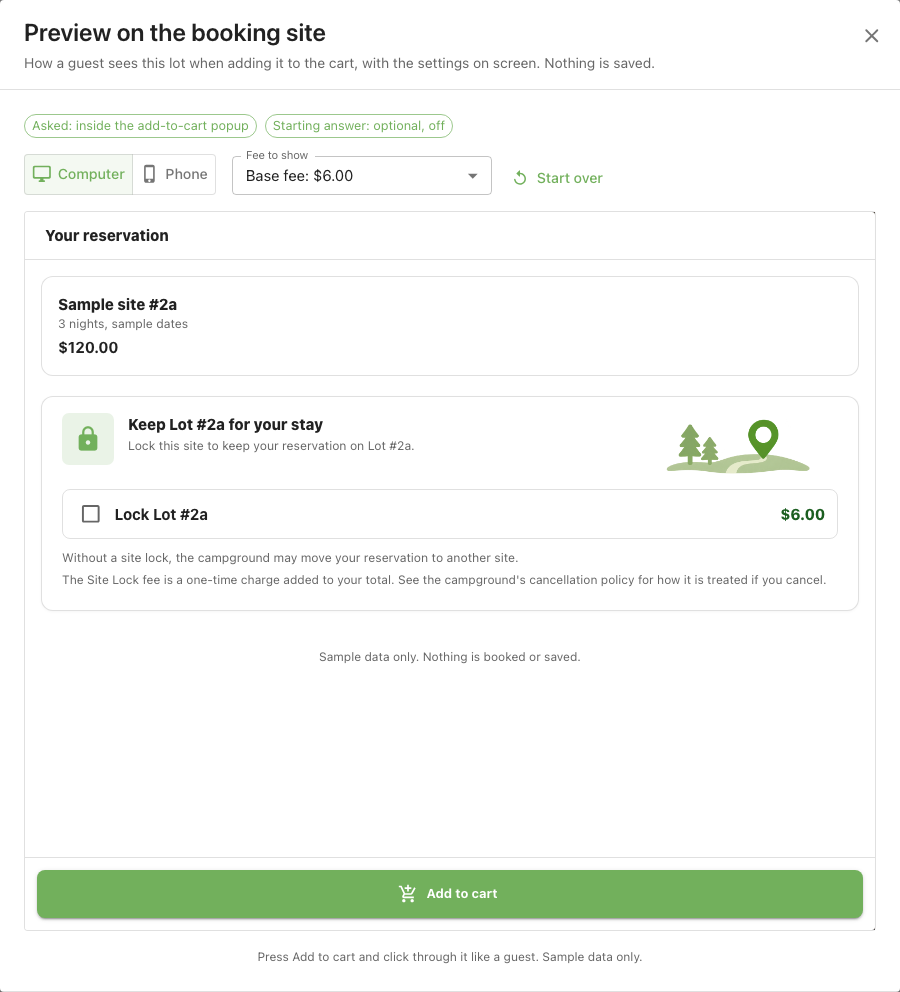
5. See it before the guest does
Preview on booking site shows your real booking page with sample data, on a computer or a phone, using the settings on your screen. Nothing is saved. You can click through it as a guest, try each fee, and start over.
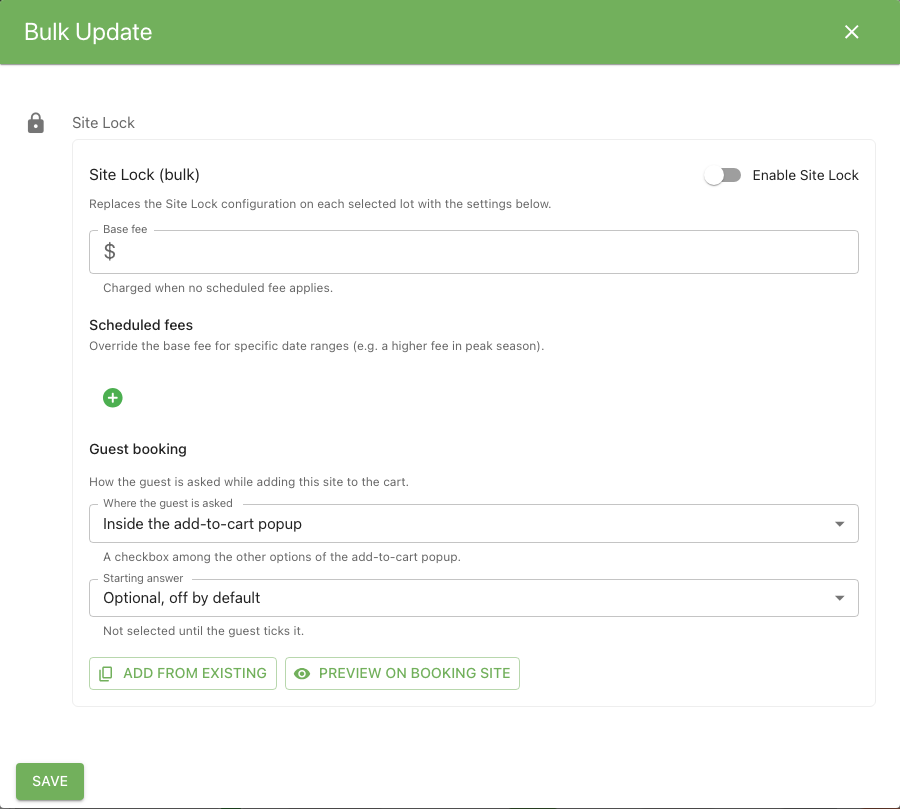
6. Update many sites at once
Select lots in the Lots grid and use Bulk Update > Site Lock to set the fee, the dates and the guest options on all of them. Or use Add from existing to copy one lot's settings onto another.
7. Who on your team can do what
Site Lock actions are controlled by privileges, per user, and they are off by default:
| Privilege | What it allows |
|---|---|
| Add Site Lock | Add a lock to a reservation. |
| Edit Site Lock Fee | Change or waive the fee. |
| Remove Site Lock | Remove a lock. |
| Move a Locked Reservation | Move a locked reservation, with a written reason. |
| Site Lock Fees (reports) | Open the Site Lock Fees report. |
A seasonal employee can look at a locked reservation without being able to waive the fee.
A guarantee your team can actually keep
A paid guarantee only means something if your team can see it and respects it. Site Lock is built into the screens your staff already use.
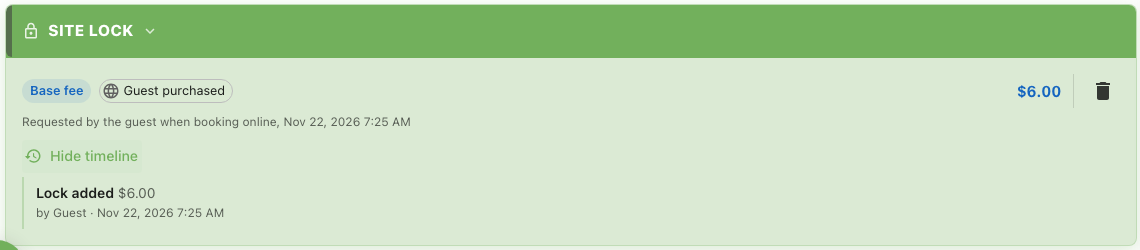
- On the reservation. A Site Lock section shows the fee, where it came from (base fee, scheduled fee or manual override), who added it and when, and a timeline of everything that happened to it.
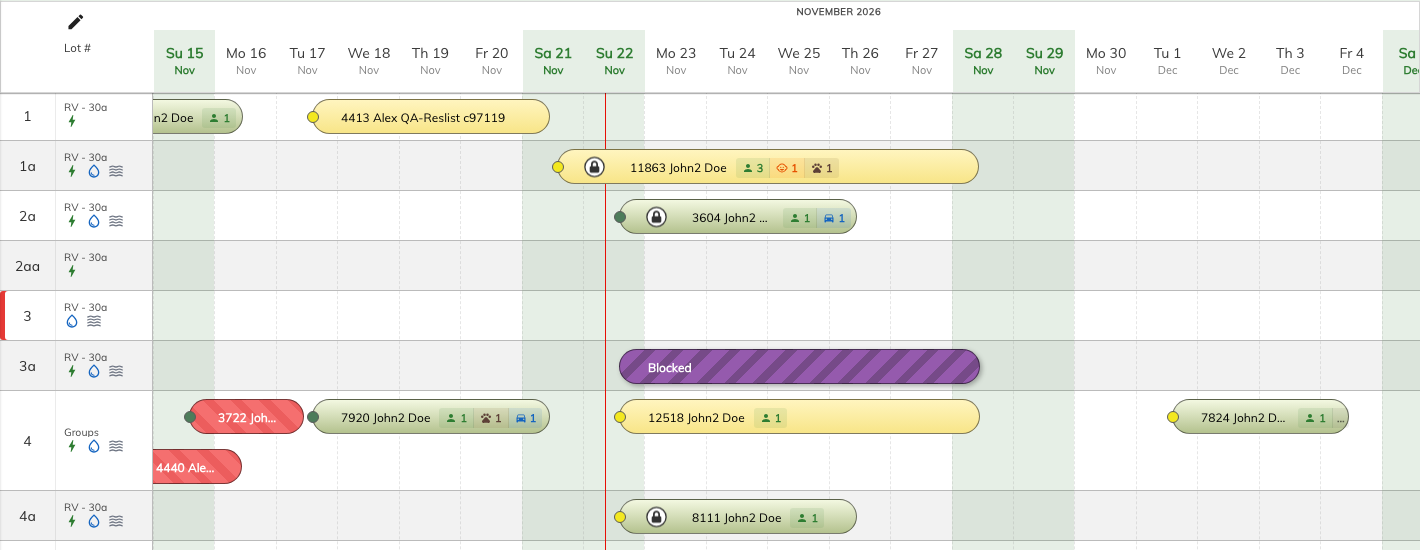
- On the calendar. A locked reservation shows a small padlock on its pill, so nobody drags it to another site by accident. Hover a reservation to switch its lock on or off from the popup.
- In the grid. A Site Lock column reads Site locked or Not locked, and you can search it. A Site Lock Total column sits next to the fees.
And if a locked reservation must move, because a site is out of service or a tree came down, the move is not blocked forever. It needs the Move a Locked Reservation privilege and a written reason. The reservation moves, the reason is kept on the timeline, and the fee is always retained. The guest paid for a promise, and the record shows why it was broken.
Courtesy locks, waived fees and honest records
Not every lock has to be sold.
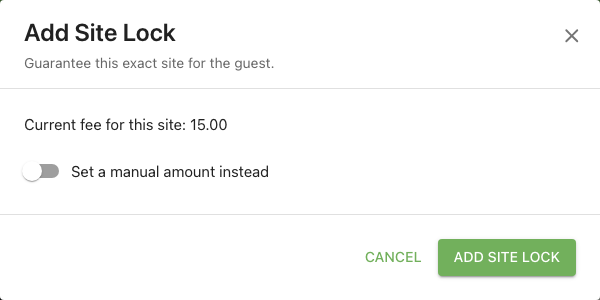
- Give a lock as a courtesy. Add the lock to a loyal guest's reservation and set the fee to 0 with a reason. The report shows it as waived, not as a missing charge.
- Change the fee. Override the amount for one reservation, with a reason you type in, and keep it until you remove the override.
- Remove a lock. Removing a lock takes its fee off the reservation, and it never refunds anything on its own. If the guest had already paid toward it, you hand the money back with the normal payment refund tools, so a refund is always a deliberate step by someone with the privilege to make it.
If a guest cancels, the lock fee is kept. It counts in the cancellation fee on the cancel screens and is not counted when a percentage cancellation fee is worked out. If you would rather give it back, remove the lock first, then cancel. If a cancelled reservation is reactivated, its lock comes back with it.
Know exactly what Site Lock earns
You cannot manage what you cannot see. Site Lock has its own reporting.
- The Site Lock Fees report lists one row per lock: the reservation, the lot, the fee charged, the tax, and what was waived, removed, overridden or retained.
- The Daily Financial Close has its own category, Site lock fees, so the revenue stays separate from your regular site fees. A fee kept on a cancelled reservation has its own line, Site lock fees retained, instead of hiding inside the cancellation fees.
- The Financial Summary and Sales Reconciliation show a Site Lock column and line, so the figures add up to the totals.
- Email Actions include Site Lock Added and Site Lock Removed, so you can tell the guest in your own words.
Questions to ask any platform about a guaranteed-site fee
Whatever software you use, these questions have clear answers or they do not. Disclosure: this post was written by the PitchCamp team. We have not tested other platforms' versions of this feature, so we have not made claims about any of them. Ask each one for written answers.
| Ask this | How Site Lock works at PitchCamp |
|---|---|
| Can I set a different fee for each site? | Yes. Each lot has its own base fee. |
| Can the fee change by date? | Yes. Scheduled fees by date range, per lot, and the fee follows a changed arrival date. |
| Can I turn it on for some sites only? | Yes. It is switched on per lot, or for many lots with a bulk update, and the whole feature has its own switch in Campground Settings. |
| Can I decide how the guest is asked? | Yes. A checkbox or a separate pop-up, and the starting answer, per lot. |
| Can I see what the guest sees before it goes live? | Yes. A preview on the booking site, on a computer or a phone. |
| Can I waive or change the fee for one reservation? | Yes, with a reason, kept on the timeline. |
| Can I control who on my team can waive, remove or move a locked booking? | Yes. Separate privileges, off by default. |
| What happens when a locked reservation has to move? | A privilege and a written reason are required, and the fee is retained. |
| What happens to the fee if the guest cancels? | It is kept and never refunded automatically, and the reports show it on its own line. |
| Can I report on it? | Yes. A dedicated report and its own Daily Financial Close categories. |
| Which plan includes it? | Premium only. |
Frequently asked questions
What is a campsite lock fee?
A campsite lock fee, called Site Lock in PitchCamp, is an optional one-time fee a guest pays to guarantee the exact campsite they booked. The reservation stays on that site, and your team cannot move it without a recorded reason.
Can I charge a different Site Lock fee for each site?
Yes. Every lot has its own base fee, and you can add scheduled fees for date ranges, such as a higher fee in peak season.
Is Site Lock on for all my sites?
No. It is off by default. You turn it on for the campground in Campground Settings, then switch it on lot by lot. You can also update many lots at once with a bulk update.
Can I give a guest a lock for free?
Yes. Add the lock to the reservation and set the fee to 0 with a reason. The Site Lock Fees report shows it as waived.
What happens if I have to move a locked reservation?
You need the Move a Locked Reservation privilege and a written reason. The reservation moves, the lock is released, the reason is recorded, and the fee is retained.
What happens if a guest cancels?
The Site Lock fee is kept, and it is not counted when a percentage cancellation fee is worked out. To give it back instead, remove the lock first and refund what the guest paid with the normal refund tools, then cancel.
Does removing a lock refund the guest?
No. Removing a lock takes the fee off the reservation, and nothing is refunded automatically. If the guest had already paid it, refund them with the normal payment refund tools.
Which PitchCamp plan includes Site Lock?
Site Lock is part of the Premium plan only.
Can guests turn Site Lock on themselves?
Yes, when they book online, if you have switched it on for that lot, and afterwards from My Reservations. Your staff can also add a lock to any reservation. When a guest adds a lock after booking, they are told that once it is on, only the campground can remove it.
Sell the promise you were already making
Your guests were already asking for a particular site. Your staff were already keeping the promise as best they could. Site Lock puts a price on it and lets you set that price site by site.
Learn more in the Site Lock setup guide, which walks through the whole process step by step with screenshots of what guests see and what you see.
Book a free demo at pitchcampmanagement.com or start for free and ask us about the Premium plan. 🍁
Related reading: - Ask Before They Arrive: How Booking Questions Save Campgrounds From Costly Surprises - Your Cancellation Policy Is Making or Losing You Money - How to Prevent Campground Overbooking - Campspot vs PitchCamp: Campground Software Comparison
Tags: campground site lock fee · guaranteed campsite fee · charge guests to lock their campsite · campground premium site fee · campground booking software site lock · campground add-on revenue · campground per site pricing · campground software privileges · campground cancellation fee retained · PitchCamp · Canadian campground management software